Everyone Uses AI. Almost No One Runs on It.
By 2025, AI sat in every designer's browser. It drafted copy, generated images and suggested layouts, yet the work around the work still ran on manual effort.
Reviews, documentation, version control, handoffs and status updates: this is the operational layer of design, and it is where leaders lose their weeks. Studies from McKinsey and IBM put it at 20 to 30 percent of a design leader's time, hours taken from strategy, mentorship and the decisions only leaders can make.
Fintech, SaaS and healthtech were already investing heavily in intelligent operations. Design teams, with mature systems and growing pressure to prove their value, had been left out of that shift.
0%
of designers surveyed use AI daily or weekly
0%
use it only for surface tasks like copy and visuals
<11%
feel confident applying it beyond creative work
20–30%
of a design leader's time goes to manual operations
Problem Statement
Design teams use AI to make things faster, not to run their work better. Without a shared language, a framework or the confidence to decide where AI belongs, it stays a creative shortcut, and design leaders keep losing a quarter of their week to coordination.
Reframing the Brief
The original brief asked how AI could help design teams. That question invites a tool, so I rewrote it to invite a decision.
Before any research began, I pressure-tested the brief with six questions. Answering them early meant the project would be judged on the change it created rather than the artifact it produced.
How can AI help design teams?
Where should AI run a design team’s operations, and how will we prove it was worth it?
Why This
AI use in design is rising but superficial. Its operational potential, in reviews, documentation and handoffs, is almost untouched.
What
A research-backed intervention such as a framework, operating model or playbook. Not another AI tool.
For Whom
Design leaders and DesignOps teams in design-mature organizations, and the consultancies that serve them.
With Who
A DesignOps lead, an AI engineer, a product manager, a change consultant and a design strategist.
How Much
A modeled $500K first-year investment and $50K a year to sustain it, the baseline for the ROI case.
By When
Ten weeks on a Double Diamond, with the last four reserved for prototyping and testing.
Success meant four things: pinpointing where AI saves measurable time, cost and burnout; designing something that scales rather than a one-off fix; tying the change to business ROI; and repositioning AI as a collaborator for design leaders instead of a shortcut for makers.
Not Another AI Tool
- Decision
- Define the deliverable as a way for teams to decide on AI, not as software that runs it.
- Trade-off
- Nothing to demo on day one, and a harder story to tell than an app.
- Why
- The market already had creative AI tools and generic automation platforms. What it lacked was the layer that helps a team agree on where each belongs.
Where Design Teams Lose Their Time
I looked at the problem from three distances: the market through desk research, the field through a survey and the individual through in-depth interviews.
The Market
Other industries showed what operational AI can do. Omega Healthcare automated up to 70 percent of its documentation and saved more than 15,000 hours a month. BP cut simulation time from 30 hours to 20 minutes. Design had no equivalent story.
Mapping the landscape showed why. Creative AI tools like Figma, Firefly and Runway speed up making but ignore feedback, versioning and coordination. Automation platforms like n8n, Zapier and Make understand logic but not design teams. Nothing sat between them.
The Field
A survey of 58 designers and design students measured how deep everyday AI use really went. Exposure was nearly universal; confidence was rare.
Exposure Is Universal. Confidence Is Rare.
Survey of 58 designers and design students, Fall 2025
And 72 percent were teaching themselves, a sign that organizations offered no framework, training or support for going further.
The Individual
Eight in-depth interviews with senior designers, operations specialists and emerging leaders explained the numbers. The blockers weren't technical. They were strategic and emotional.
I don't really know what's best for what.
I think I lack understanding of how AI works in the first place.
Never heard of workflow automation. Isn't that a coding thing?
I feel a challenge while organizing and managing the AI output.
There is no process or framework to follow on how to use it effectively.
Understanding AI on a deeper level feels too technical and boring.
Across every conversation, five themes kept returning.
No Sense of Fit
People couldn't tell which tool suited which task, so they hesitated or didn't try.
A Shallow Mental Model
Awareness was high, but understanding of how AI works beyond generation was low.
Output Without a Home
Even active users struggled to organize, validate and store what AI produced.
Automation Sounds Like Code
The word itself triggered thoughts of scripts and APIs and shut the conversation down.
No Framework to Follow
No norms, toolkits or practices existed for bringing AI into recurring work.
Who I Designed For
Not a beginner experimenting with AI, and not an engineer building it. My user sits in the middle: strategic enough to lead, overwhelmed by operations. A senior design manager or DesignOps lead in a mid-to-large product company, with access to AI tools, no structured way to use them at scale and constant pressure to prove ROI. Underneath the practical jobs of streamlining work and proving impact were emotional ones: to feel in control, not behind; confident, not confused.
- Leads
- Cross-functional teams
- Works In
- Figma, Jira, Notion, Miro
Three Doors, One Pivot
The research pointed to three directions. Each solved part of the problem, and none solved it alone.
A No-Code Workflow Builder
Let designers automate their own operations. But most lacked confidence in AI logic, so adoption could stall.
An AI Literacy Program
Teach automation to non-technical creatives. But passive learning rarely changes how people work.
A Consultancy Toolkit
Help consultancies deliver automation strategy to clients. But it sat furthest from the teams feeling the pain.
- No-Code Workflow BuilderToo technical for most teams
- AI Literacy ProgramLearning alone rarely changes behavior
- Consultancy ToolkitThe one piece testable in ten weeks
- The Synergy DeckFounding IP of an AI × Design consultancy
Gaps existed at every level, from awareness to execution to scale, so the real answer had to be a system. Ten weeks, with four left for prototyping, couldn't hold one. I chose the strategic framework as the piece I could genuinely validate, and then saw the larger problem: frameworks fail when nobody carries them into the room.
From Prototype to Business
- Decision
- Make the framework the founding IP of an AI × Design consultancy rather than a standalone deliverable.
- Trade-off
- A wider scope to defend, with a business model and a go-to-market plan to prove alongside the design.
- Why
- Adoption depends on delivery. A consultancy can bring the framework into organizations through audits and workshops, learn from every session and later fund the software.
The opportunity was large enough to matter: about $10B in AI-driven workflow optimization, $1.8B among design-mature organizations and $250–300M among teams actively investing in DesignOps transformation.
- TAM
- $10B
- AI-driven workflow and design process optimization
- SAM
- $1.8B
- Design-mature organizations
- SOM
- $250–300M
- Teams actively investing in DesignOps transformation
20–30%
operational hours returned to design teams
15–25%
reduction in operational overhead
$0K
modeled first-year investment
Those returns, modeled on McKinsey, Deloitte and IBM benchmarks, shaped a business that runs on two engines: high-touch consulting for early revenue, through audits, roadmaps and transformation retainers, and licensing of the toolkit and platform for scale.
The Synergy Deck
Adoption doesn't happen inside a tool. It happens in a room, between people with different stakes. So I designed the room.
Click a card to meet the archetypeTap a card to meet the archetype
I weighed four formats against speed of validation, ease of adoption and fit with how teams really behave: an interactive web tool, a workshop playbook, printable canvases and a card game. The web tool would have hard-coded untested assumptions. The playbook and canvases were too passive to surface real tension. The card game could do what none of the others could.
A Card Game Before Software
- Decision
- Prototype the adoption conversation as a physical card game instead of a digital product.
- Trade-off
- It needs a facilitator, captures less data and can't run without people in the room.
- Why
- It needed no logins or IT approval, could change between sessions and showed how people actually decide, not how they say they would.
Each player argues from one perspective, so every viewpoint gets a voice and tension surfaces safely.
Click a card to turn it overTap a card to turn it over
The mechanics borrow from games people already know: hidden roles from Avalon, trade-offs under scarcity from Catan, association from Codenames and escalating events from Pandemic. Five or six players move through five rounds in about an hour.
- 01SetupPick a DesignOps context and deal the archetypes.
- 02DrawPair AI capabilities with the team’s real tasks.
- 03DebateArgue trade-offs as risks, opportunities and events land.
- 04PrioritizePlace every decision on a value-versus-effort grid.
- 05OutputLeave with a ranked roadmap, rules and clear roles.
Playtesting
I ran 60-minute sessions with players from UX, service design, creative business leadership and design management, each followed by an open debrief. People loved the physical, conversational format, and teams began sorting cards by value without being asked. The best decisions came when players argued feasibility against strategic need.
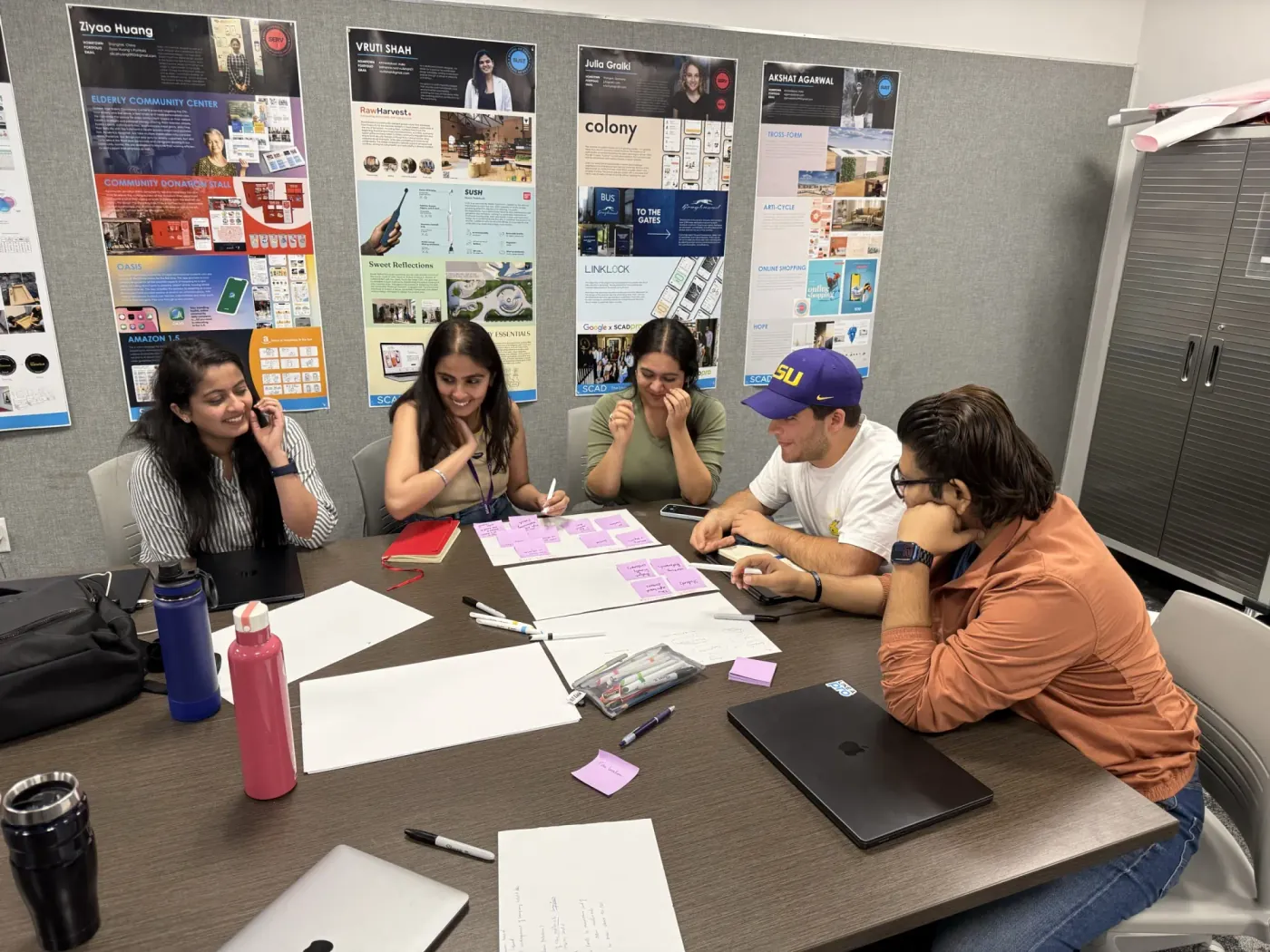
The friction was just as useful. Jargon lost players who were new to automation, and unclear roles made people hesitate. So I rewrote every card in plain language, clustered the capabilities, revealed roles at the start, added scoring and time-boxing, introduced a deck-building step that gives teams ownership, and added QR capture so a session's decisions outlive the table.
From Card Table to Platform
The deck was always phase one of a two-part system. The table is where teams decide; the platform is where those decisions run.
The second half is a DesignOps workflow platform: a logic builder modeled on n8n that turns the choices made during play into live, trackable AI workflows, with tasks, touchpoints and owners, and metrics that show what each automation is worth.
- TriggerReview requested in Figma
- AI · Analyze & LearnCluster feedback by theme
- Rule · GuardianSensitive data? Route to a person
- ActionOpen tickets in Jira
- MetricHours saved this sprint
The consultancy enters organizations through a low-risk AI-DesignOps audit, turns audit findings into transformation retainers and then brings in the platform to sustain the change. Whitepapers, conference talks and the SCAD and DesignOps communities build demand along the way.
A Mindset Shift, Not a Productivity Tool
The Synergy Deck and its platform won the European Product Design Award 2026 in Work & Office Product Design and earned multiple pitch nominations.
In playtests, mixed teams left a single session with a ranked automation roadmap, shared governance principles and clear roles. Just as valuable, the game exposed where a team wasn't ready, before anyone spent a dollar on software.
Prathamesh is a best-in-class, forward-thinking strategist exemplifying an exceptional level of adaptiveness and business acumen. For his final high-impact project, AI Beyond Automation, he tackled complex DesignOps challenges, proving his deep technical knowledge of AI. He is an orchestrator who understands how to leverage emerging tech to drive real business value. Any organization looking for a visionary Design Manager or AI Strategist would be incredibly fortunate to have Prathamesh on their leadership team.
 Jay PetersChair of Design Management, SCAD
What I Learned
Adoption Is Social Before It's Technical
The barriers were confidence and shared language, not tooling. Solve for the conversation and the tools follow.
Prototype the Conversation, Not the Software
A paper deck surfaced in an hour what a platform would have hidden for months behind onboarding and UI.
Plain Language Is a Feature
Every playtest improved when the cards got simpler. Clarity did more for adoption than any mechanic.